Yubikeys are convenient for Linux login
 Last modified April 28, 2026
I got myself a Yubikey recently, and I wanted to use it as a nice convenience to:
- Grant me sudo privileges
- Unlock my session
- Decrypt my LUKS-encrypted disk
I’ve only managed to do the first two, since they both rely on Linux Pluggable Authentication Modules (PAM). Luckily for me, one of PAM’s modules supports U2F, the standard Yubikeys rely on.
First I need to install pam-u2f to add U2F support to PAM, and pamu2fcfg to configure my key.
$ sudo rpm-ostree install pam-u2f pamu2fcfgSince I’m running an immutable OS I need to reboot, and then I can create the correct directory and file to dump an U2F key into it.
$ mkdir -p ~/.config/Yubico$ pamu2fcfg > ~/.config/Yubico/u2f_keysThen I make sure to have a root session open in case I lock myself out of sudoers.
$ sudo su#In a different terminal, I can edit the sudoers file to add this line
#%PAM-1.0auth sufficient pam_u2f.so cue openasuserauth include system-authaccount include system-authpassword include system-authsession optional pam_keyinit.so revokesession required pam_limits.sosession include system-authI save this file and open a new terminal. I type in sudo vi and it asks me to touch my FIDO authenticator before opening vi! If I touch the Yubikey, it indeed opens vi with root privileges.
Let’s break down the line:
authfor authenticationsufficientpassing this authentication challenge is enough (it’s not an additional factor of authentication)pam_u2f.sothe module we load is for U2F, the standard Yubikeys usecueprint “Please touch the FIDO authenticator.” when the user needs to authenticateopenasuserto fetch the authentication file without root privileges
It’s also possible to use it to unlock my session, but it would be a bit reckless to allow anyone with my Yubikey to log into my laptop. If my backpack gets stolen and it has both my Yubikey and my laptop, anyone can log in.
It’s possible to make the login screen require either my user password, or all of
- The Yubikey itself
- The PIN of the Yubikey
- Me to touch the Yubikey
If someone fails more than three times to enter the correct PIN, the Yubikey will lock itself and require a PUK to be unlocked. This gives me an additional layer of security, and it’s more convenient than having to type a full length passphrase.
I’ve added the following line to /etc/pam.d/greetd (the greeter I use):
#%PAM-1.0auth sufficient pam_u2f.so cue openasuser pinverification=1 userpresence=1auth substack system-auth[...]I can lose my Yubikey
I use my Yubikey as a nice convenience to set up a weaker PIN while not compromising too much on security. I use it instead of a password, no in addition to it.
Since I can lose or break my Yubikey and I don’t want to buy two of them, I make the U2F login
sufficientbut notrequired. This means I can still fallback to password authentication if I lose my Yubikey.
Finally, DankMaterialShell uses its own lockscreen manager too. I still want to be able to fallback to password authentication if need be, so I’ll configure it to accept U2F OR the password, not both.
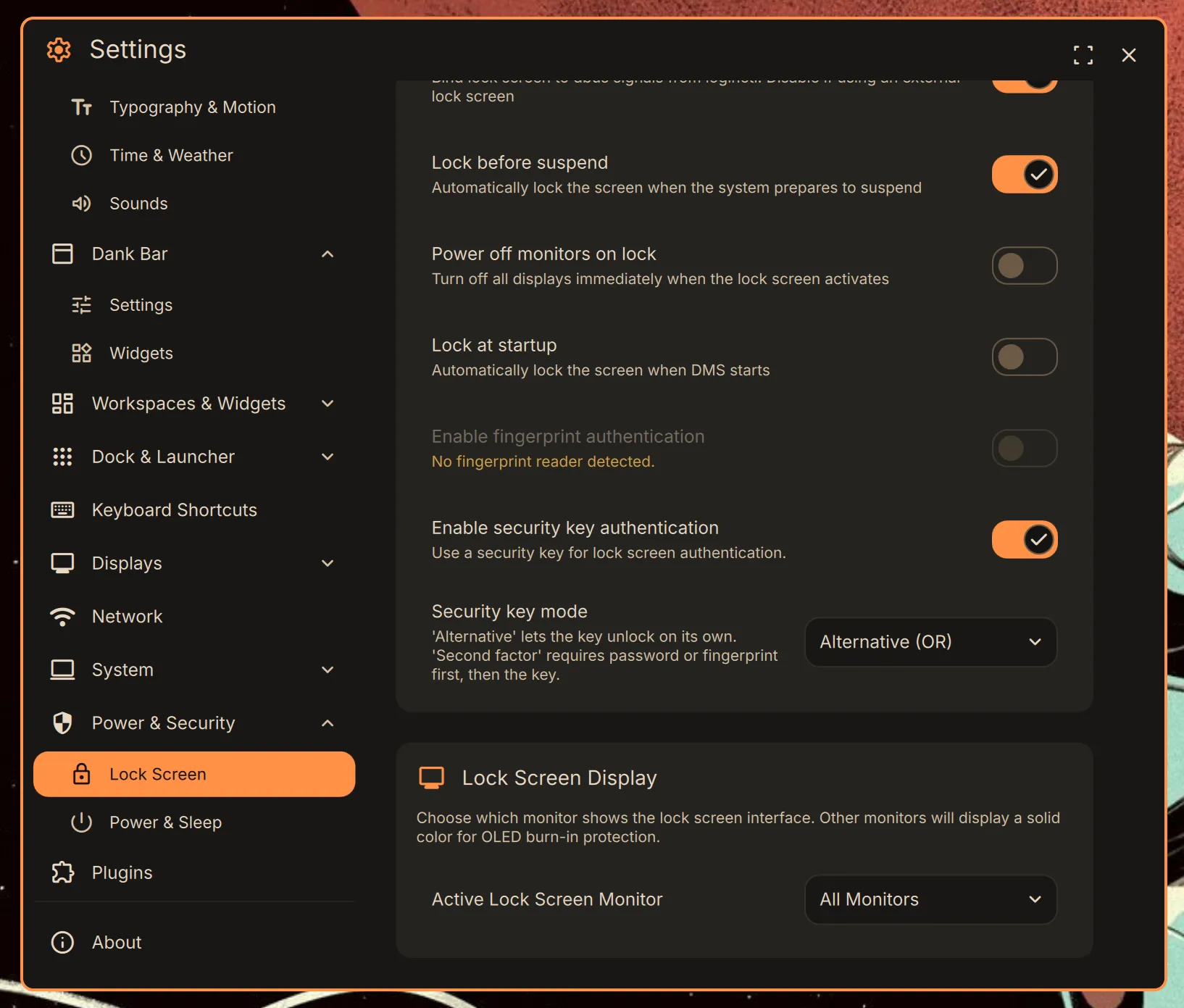
This means that the lockscreen will call /etc/pam.d/dankshell-u2f to know what to do when the screen is locked. Since this file doesn’t exist, I can create it with the following content.
#%PAM-1.0auth sufficient pam_u2f.so cue openasuser pinverification=1 userpresence=1I need a fallback for when I don’t have my Yubikey, so I also create the one for this occasion
#%PAM-1.0auth include system-authFinally, I have a consistent setup where both my login and lock screen require me to plug my key, enter its PIN and touch it, or enter my full password. When it comes to sudo, I can only touch my key without requiring an PIN.
My next quest will be to use my Yubikey to unlock my LUKS-encrypted disk.




 Comments